ARMORY FINDER
Search, sort, filter and pin your gear
"A Helldiver who can't find his rifle is a Helldiver who isn't using it." — Department of Logistics, Requisition Efficiency Memo (probably)
Search, sort, filter and pin your gear
"A Helldiver who can't find his rifle is a Helldiver who isn't using it." — Department of Logistics, Requisition Efficiency Memo (probably)
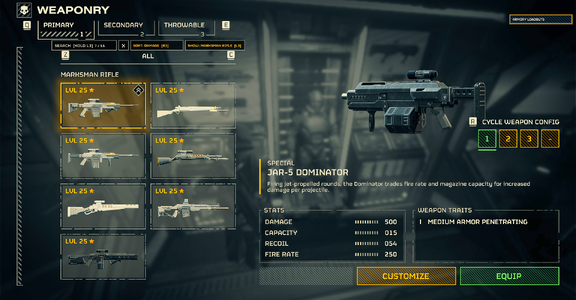
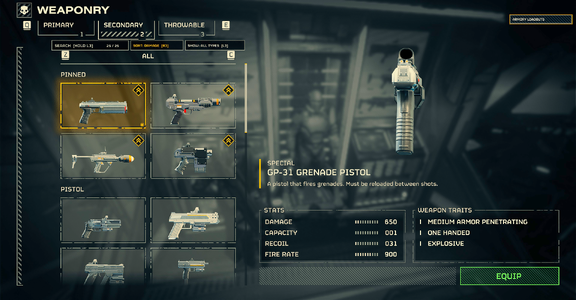
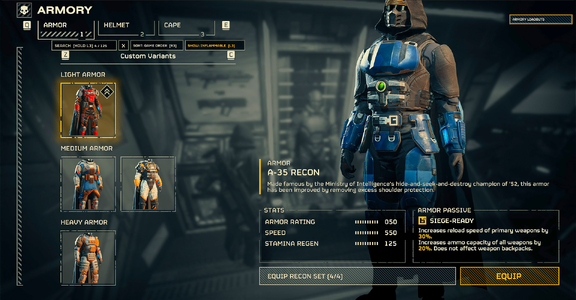
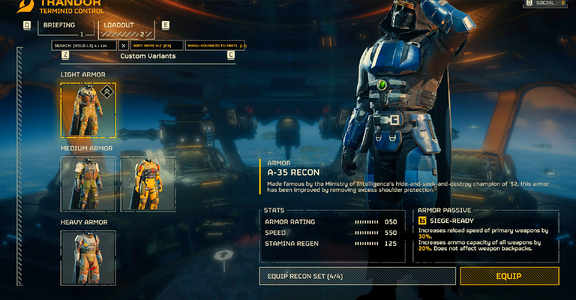
The Armory keeps growing and the list doesn't help you find anything. Armory Finder adds a small bar above the game's own equipment list: type a name or a passive, sort by damage or fire rate, show only one weapon category or one armor passive, and pin your favourites so they always stay on top, hide what you never use, and put on a whole armor set with one click. It works on the ship (Armory) and before a mission (Hellpod loadout), for primary, secondary and throwable weapons, body armor, helmets, capes and now stratagems.
The cards stay the game's own. The mod only puts the same list back together in your order through the game's own functions, so equipping, customizing, comparing and armor sets work exactly as before.
WHAT IT DOES
- SEARCH: type part of a name, a passive or what a passive does (lib, siege, reload, throwables), in your keyboard's own layout (Cyrillic, accents...). Several words means all must match. The bar shows how many items match (4 / 125). The search stays while you look at items and switch tabs; leaving the Armory clears it.
- SORT: armor by game order, name A-Z, passive or color (helmets nearest in colour to the body armor you wear come first, so you can match a helmet from another set). Weapons by game order, name, damage, capacity, fire rate or low recoil. Throwables by damage, armor penetration or blast radius. Each kind of list remembers its own sort.
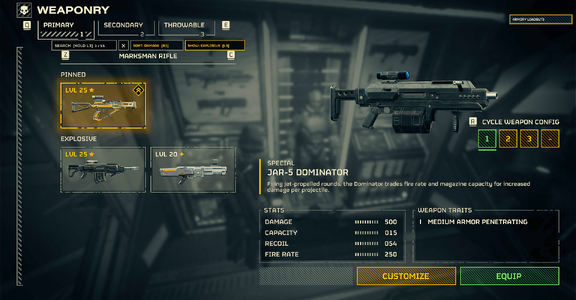
- SHOW: body armor with one passive at a time, weapons of one category at a time (the game's own: assault rifle, marksman rifle, shotgun, explosive...), stratagems of one type at a time (support weapons, backpacks, orbital, Eagle, sentries, emplacements, vehicles).
- STRATAGEMS: in the Hellpod loadout's stratagem list: search by name, type or a word of the description, sort by cooldown, show one type, pin and hide. Names and descriptions come from the game in your language, also for stratagems newer than the mod.
- MATCH: helmets and capes from the set of the body armor you wear.
- PIN: click the diamond badge in a card's corner and the card goes into a FAVORITES section on top (weapons, body armor and stratagems; it shows in the game's category switcher too). Helmets and capes have one list: pinned ones come first.
- HIDE: click the minus badge in a card's other corner (or Shift+F8) and the card is no longer listed. The HIDDEN
 button on the bar (Shift+F7) shows up whenever cards are hidden and lists only them; bring back just the one you want with its plus badge.
- EQUIP SET: on an owned helmet, body armor or cape of an armor set, a button left of the game's EQUIP puts on every piece of that set you own. Shift+click (controller: hold a trigger) leaves your cape as it is. If One Click Armor Set or Armor Transmog is installed, Armory Finder hides its own button and leaves it to them.
- YOUR LANGUAGE: the bar follows the game's language: English, German, French, Spanish, Italian, Polish, Portuguese, Russian, Ukrainian, Japanese, Korean, Chinese (machine translations, corrections welcome). Missing yours? Copy languages\en.txt to your code, translate it, and write the code in language.txt (details in languages\README.txt).
- WRONG LANGUAGE? To force one, create language.txt in %LOCALAPPDATA%\CowboyBingus\Helldivers2\ArmoryFinder\ with one line: the code, e.g. en, de, zh-CN. Restart the game. languages\README.txt lists the codes.
CONTROLS
Mouse: click the buttons on the bar: the search field, X (clear), SORT, SHOW / MATCH, HIDDEN, and the badges on a card. ? at the end of the bar shows all controls.
Keyboard:
- Ctrl+F: search. Type in your keyboard's layout. Backspace deletes, Delete clears, Enter or Ctrl+F keeps the result, Esc clears the search. While you type, the game doesn't see your keyboard; your key bindings come back as soon as typing ends and nothing is saved to your settings.
- F6: sort. F7: SHOW / MATCH. Shift+F7: HIDDEN. F8: pin / unpin the highlighted card. Shift+F8: hide / bring back the highlighted card.
GOOD TO KNOW
- Safe: runs only on the game build it was made for (Steam 25480438) and checks every game location it uses first. After a game update it switches itself off and says so in STATUS.txt until it is updated. No gameplay, network or save changes; only your screen changes.
- Weapon names and categories come from the game, also for weapons newer than the mod. Weapon stats for sorting come from the game's own item records where the mod finds them, otherwise from community tables. Searching, sorting or filtering puts every matching item in one list on top, across the game's categories (RESULTS). A weapon with no known stats goes to the end in a stat sort.
- Your pins and sorts are saved in %LOCALAPPDATA%\CowboyBingus\Helldivers2\ArmoryFinder. Pins and sorts from the test builds (Armory Search & Sort) carry over.
- Why Ctrl+F: F5 toggles a performance overlay on some setups and F9 belongs to Mission Debrief.
- Search with the Steam on-screen keyboard (controller) is not tested yet. Feedback welcome.
COMPATIBILITY
Armory Finder works together with Armor Transmog and DiverKit and makes a great companion for them: the more variants and gear they add to your Armory, the more a search, a sort and a few pins help.
- Armor Transmog: its Custom Variants and + card are never moved (creating variants works), your FAVORITES come right after them, the hide badge moves under the pin badge so its passive icon stays visible, and its own set button is used instead of ours. If another mod keeps rebuilding the same list, Armory Finder pauses sorting for that list and says so in the bar.
- One Click Armor Set: works; Armory Finder's own EQUIP SET hides itself and leaves the job to it. When a search leaves a single card, its 3D preview can look stale; clear the search.
- You can force Armory Finder's EQUIP SET on or off in settings.txt (equip = auto / on / off).
- Ship Station Hotkeys (Vanilla Plus Megapack): also uses F6 / F7 / F8 on the ship, but does nothing while the Armory is open.
- Stratagem Favorites: works; its FAVORITES group is kept and you pin stratagems with its F3. Armory Finder's own pins are off in the stratagem list while it is installed.
- DiverKit: if its stick navigation gets in the way, set controller_l3 = off in Armory Finder's settings.txt.
REQUIREMENTS & INSTALL
- Bingus Shared Loader, kept last in the load order.
- Import the ZIP in HD2 Arsenal or HD2 Mod Manager, enable, then Deploy.
BUGS
Please report bugs in the Bugs tab and attach ArmoryFinder.log and STATUS.txt from %LOCALAPPDATA%\CowboyBingus\Helldivers2\ArmoryFinder.
CREDITS
- CowboyBingus: Bingus Shared Loader and Runtime, Mod Bindings Menu (key binding records).
- Match Your Colors by CowboyBingus: the armor and helmet colours for the colour sort.
- One Click Armor Set by alomare: armor set table, Hellpod loadout, game text lookup, how the game equips a set. HD2 Transmog: list functions, input handling, menu research. Stratagem Favorites: card layout and positions. DiverKit: weapon catalog, mouse mapping.
- helldivers-2/json (MIT): weapon stats. shalzuth: HelldiversData (weapon names). MrChengl11: HD2 Lua Mod Skill.
- helldivers.wiki.gg: armor passive effect texts used for search (CC BY-NC-SA 4.0).
- Artwork fonts: Black Ops One and Saira Stencil One (SIL OFL).
CHANGELOG
- 1.2.2: fix: on 1.2.1 the newer weapons still showed as #id and search couldn't find them by name; now it can. The Voidwalker helmet is found by name too.
- 1.2.1: weapon names now come from the game itself (in the game's language), so the weapons of the last year (about 50 that showed as #id) are found by name. Capes and helmets the game gives no name to get their armor set's name (e.g. CW-22 Kodiak helmet). With the X shown, the search field reads SEARCH instead of a cut ".CK TO SEARCH".
- 1.2.0: from your feedback, thanks! Stratagems: search, sort by cooldown, show by type, pin and hide in the Hellpod loadout. HIDDEN button to bring back a hidden card. EQUIP SET without the cape (Shift+click). KDM-500 Outrider body armor is found by its name. ? on the bar shows all controls. Controller: the touchpad puts it on the bar, R3 pins, R3 held 5 s hides. Lighter on performance. A Cyrillic keyboard layout types Latin letters while the game is not in Russian or Ukrainian; controller hints show only while you use the controller. A new search, sort, filter, pin or unpin takes the list back to its top. The bar follows the game's own language (Steam in another language no longer shows ???). Armor Transmog: its variants and + card are never moved (creating new variants works again). Some newer armors are named instead of shown as #id. Sharper pin and hide badges. SORT: COLOR for body armor and helmets. NAME A-Z puts unnamed items last. Search, sort and filters now show their results in one list on top, across the game's categories. Pinned weapons, body armor and stratagems in a FAVORITES section of their own on top. Fixed a crash in the weapon list.
- 1.1.1: fix: after a search the mouse no longer stops turning the camera once you leave the Armory. The mod held back the game's mouse and stick look while you typed; it never does now, and an old lock_actions.txt is cleaned automatically. Thanks to everyone who reported it!
- 1.1.0: from your feedback, thanks! Hide cards you never use (Shift+F8 or the badge). EQUIP SET button (hidden when One Click Armor Set or Armor Transmog shows its own). Search in your keyboard's layout and by what a passive does. Bar texts translated into 12 languages, plus your own language files. The result count no longer runs into the search field. Key bindings come back even if the game moved them while you typed (camera stuck after leaving mid-search). items.txt in the mod folder for bug reports.
- 1.0.0: first release. (The test builds were called Armory Search & Sort.)
Developed with AI assistance (Claude).
Not affiliated with Arrowhead Game Studios or Sony Interactive Entertainment. Use mods at your own risk.