Pick your Bots/Bugs/Squids 2.0

A Mod for Helldivers 2
Pick your Bots/Bugs/Squids akl_mod_preview_image
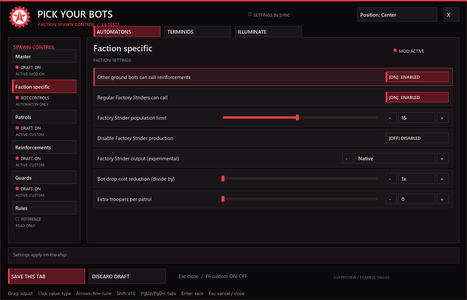
  • 02-Automaton-Settings.png
    02-Automaton-Settings.png
    83.8 KB · Views: 2,003
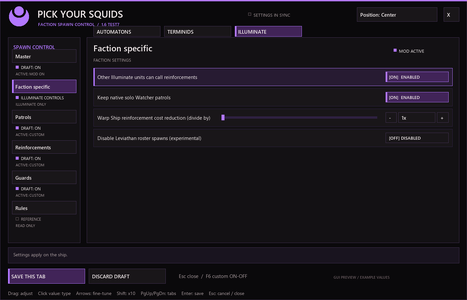
  • 04-Illuminate-Settings.png
    04-Illuminate-Settings.png
    76.7 KB · Views: 1,698
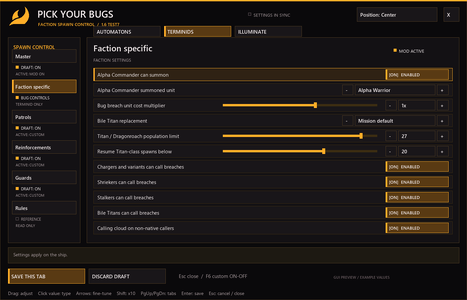
  • 03-Terminid-Settings.png
    03-Terminid-Settings.png
    96.1 KB · Views: 1,428
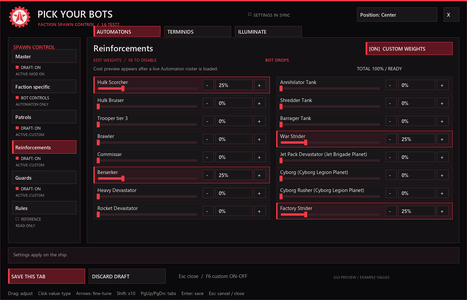
  • 05-Automaton-Drops.png
    05-Automaton-Drops.png
    99.3 KB · Views: 1,263
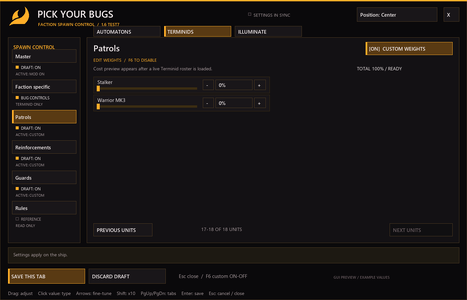
  • 07-Terminid-Patrols-More-Units.png
    07-Terminid-Patrols-More-Units.png
    73.9 KB · Views: 1,041
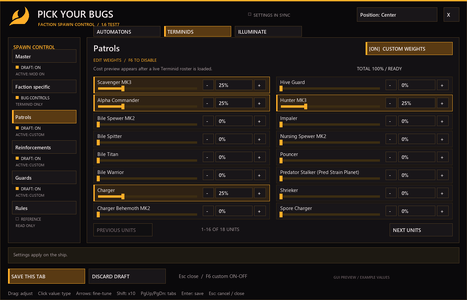
  • 06-Terminid-Patrols.png
    06-Terminid-Patrols.png
    98.1 KB · Views: 905
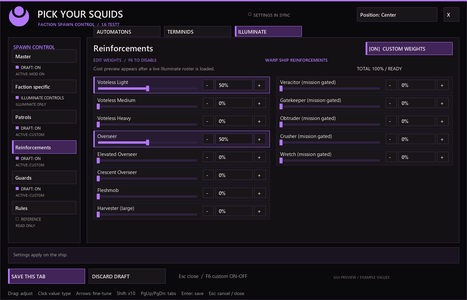
  • 08-Illuminate-Reinforcements.png
    08-Illuminate-Reinforcements.png
    98.1 KB · Views: 1,413

https://hf-mod.com/Mods/Details/17​

Hellforge port
Get Hellforge if u want full functionality

Pick Your Bots / Bugs​

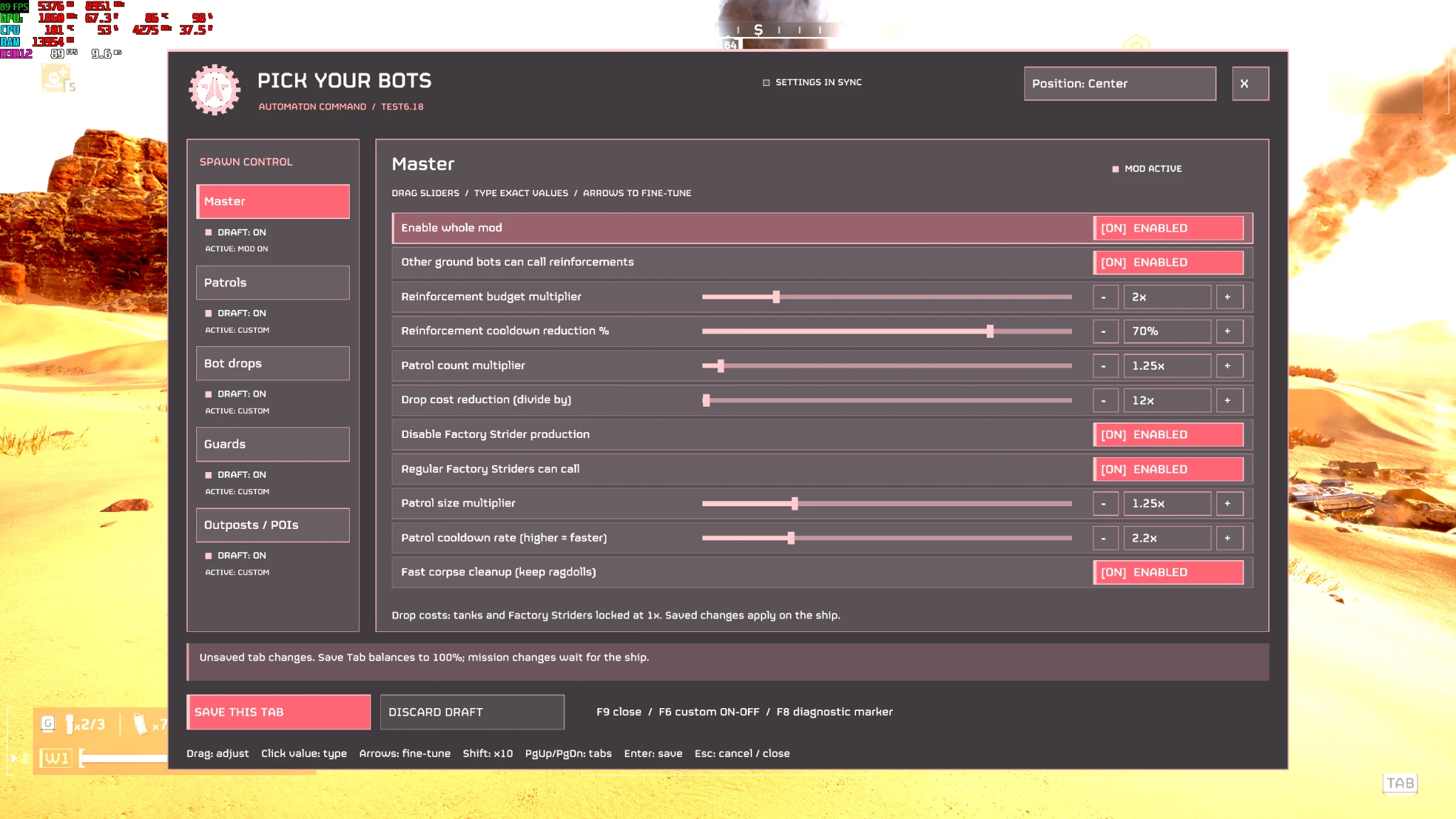
Customize the enemies you fight, with separate Automaton and Terminid mixes for patrols, reinforcements, guards, and POIs/outposts.

Read all this before posting an issue
Set a key to it first in mouse and keyboard if u want, theres a default key (F9) assigned at first install


Some units may not spawn in bugs due to them being not available (if you see ? marks, use operation reroller to get an eligible mission with that seed, for ex pouncers cant spawn on a bile seed mission, but other bugs (like hunters/stalkers/alpha commanders which are common) will replace the bile seed ( in this example)
Read the rules in the rules tab in the mod.

Build your own enemy mix​

Set individual unit percentages for each spawn category. Faction weights save separately, so changing your Terminid mix won’t change your Automaton setup.

Shared Master controls​

Adjust reinforcement budgets and cooldowns, patrol counts, patrol sizes, patrol frequency, and corpse cleanup across factions.

Population guard (Main tab, on by default)

The guard is the mod’s crash protection. Helldivers 2 crashes or breaks when too many enemies exist at once. Every half second in a mission, the guard reads the game’s own counters (enemies waiting to spawn, enemies alive and AI agents) and holds new spawns back before things get out of hand:
  • It pauses reinforcements early, so one more wave still fits under the limit. It learns how big a wave is in each mission.
  • It lets a smaller wave through when only some room is left.
  • It pauses patrols at the limit.
  • It always pauses everything at 200 enemies alive or 400 AI agents, whatever the limit is set to.

Enemies already on their way still arrive. The guard only holds back new spawns and never removes anything.

Enemy limit, all factions (default 180, range 60 to 240): how many enemies (waiting to spawn plus alive) the guard allows before it holds spawns back. One limit now covers bots, bugs and squids.
  • Lower it if your game struggles or crashes in big fights.
  • Raise it for bigger fights, with less safety margin. The 200 alive / 400 agents ceiling always applies.
With the advanced tabs:
  • Release and the patrol limit only work while the guard is on.
  • Every released squad has to fit under the limit first.
  • While the guard is holding spawns back, released squads and added callers wait. Patrols stay at normal size until it opens up again.
Leave the guard on. Turning it off keeps the rest of the mod working, but removes the crash protection and switches off release and the patrol limit

Opening the advanced tabs: open the panel (Mod Bindings Menu binding or F9) and go to MAIN. The top row has ADVANCED BOTS / SQUIDS (used on Automaton and Illuminate missions) and ADVANCED BUGS (used on Terminid missions). Both tabs have the same rows in the same order.


Controls at the top
  • [ON] ADVANCED / [OFF] GAME DEFAULT (or F6): turns the whole tab on or off. Off means game default for everything on the tab, and your values are kept for later.
  • RESET TO DEFAULTS: release off, patrol limit off, all values back to default.
  • SAVE THIS TAB: saves your changes. They apply the next time you are on the ship. A running mission keeps its settings.
The settings
  1. Limit patrols (default off): stops new patrols while too many patrol enemies are alive.
  2. Patrol limit (default 80): how many patrol enemies can be alive before patrols stop. Only patrol enemies count, not drops or breaches.
  3. Release held reinforcement drops / bug breaches(default off): above about 100 enemies, the game still accepts reinforcement calls but holds most of the squads back until the call expires. With this on, those held squads are sent in, from every call (the game’s own callers and the mod’s added callers), within the guard limits. Built in:
    • calls stay alive while squads remain,
    • objective waves go first,
    • a call nobody is near for 20 seconds ends,
    • bug breaches open on the caller’s side with up to 5 holes.
  4. Released squads per call (default 30): how many held squads one call can send.
  5. Endless (default off): ignores the per call number, so a call keeps going while players are near it.
  6. Repeat squads when a call runs out (default off, needs Endless): a call that has used all its squads starts over.
  7. Follow players (default on): a call stops once every player has moved away from it.
  8. Follow distance: how far you can move away before a call stops. Bots and squids: metres from the nearest landing point (default 80). Bugs: metres from the nearest breach hole (default 40).
  9. Enemies in the air at once / Bugs emerging at once (default 80 / 40): caps how many released enemies are on their way at the same time.

How the population guard affects these tabs: the guard (Main tab, on by default) is the crash protection. It watches enemies queued, enemies alive and AI agents, and holds new spawns back near the enemy limit (default 180). It always holds spawns back at 200 enemies alive or 400 agents.

  • Release only works while the guard is on. Every released squad has to fit under those limits first.
  • Rows 4 to 9 only do something while Release is on.
  • Limit patrols also needs the guard on.
  • While the guard is holding spawns back, released squads and the mod’s added callers wait too. Patrols come at normal size until it opens up again, so you don’t get a big burst.
  • An advanced tab switched off still has the guard’s limits.

Suggested setups
  • Close to vanilla: release off, patrol limit off. Only the guard differs from the game.
  • Harder fights: release on, 30 squads per call, Endless off, enemy limit 180 to 200.
  • Horde: release on, Endless on, Repeat on, Follow on, enemy limit 200. Calls keep coming while you stay near them; walk away to end them.
  • Fewer patrols in big fights: Limit patrols on at 60 to 80.

Automaton controls​

  • Additional reinforcement callers.
  • Factory Strider reinforcement calls.
  • Adjustable Factory Strider population limit.
  • Disable Factory Strider production or select its output.
  • Bot drop cost adjustments and extra patrol troopers.

Terminid controls​

  • Enable or disable Alpha Commander summons.
  • Choose from 11 summon options, or randomize the choice per mission.
  • Adjust bug breach costs.
  • Allow Chargers, Stalkers, and Bile Titans to call breaches, with the small caller-cloud effect.
  • Adjustable Titan/Dragonroach population cap and resume threshold, without stopping other bugs.
  • Bug holes use your Guards selection subject to the hole’s supported spawning behavior.
  • Selected nest guards use equalized affordable prices.
  • Guards set the poi and nest guards and bug hole production choices

Do not use it with any other spawn multiplier or surge mod, they all can change the same settings and crash.​

390 KB
Log in or sign up to download
Uploaded by
Feroz77
Downloads
2,612
Comments
224
Views
27,012
First release
Last update
Platform
PC 
Version
2.0
Total Size
390 KB
Rating
4.00 star(s) 17 ratings

Uploaded by

  • 2,612
  • 27,012

Ratings

4.00 star(s) 17 ratings

More mods from Feroz77

  • PC Hell Dead Redemption

  • PC SG-226 Heavy Breaker

  • PC MG-206 Belt fed Heavy Machine Gun

  • PC Knife Tips - Explosive & Gas

  • PC Super Jericho Missile

Latest updates

  1. Pop cap increase and Endless mode update (plus an extra)

    New: release held reinforcements (Advanced tabs, off by default). Above about 100 enemies the...
  2. Native data not writable possible fix

    .
  3. Bug fix

    Fixed a bug where disabling the mod still allowed Illuminate and Terminid mixes to apply

Hanzo790

Members
Members
Sep 26, 2026
5
3
Kinda Suspicious mod....U can't find the hotkey to keybind.....No demo video.....i might put this mod in 1 star rating until author add demo video. sorry

its odd since i update all the requirements and only deploy this mod and bingus mods...yet i cant find the keybind
 

ciberkid22

Members
Members
Sep 11, 2026
4
1
Just tried. Still getting the same error. I'm playing on Fedora Linux if that helps. Here's the log.txt

PICK_YOUR_BOTS_PANEL ready hotkey=ModBindingsMenu_or_F9 renderer=stingray fail_closed=true manual_retry_only=true stable_retained_primitives=true bounded_layers=940-952 resource_ids=frame_local input_capture=true sliders=enabled tab_toggle=F6 callback_free=true
status=idle_faction_unknown
SPAWN_TUNING_STATUS waiting_for_active_mission
status=idle_faction_unknown
PERF memory_reads_per_second=123 game_mode=3
status=idle_faction_unknown
PERF memory_reads_per_second=266 game_mode=4
MISSION_FACTION automaton
unit_mix native_data_not_writable
status=mix_waiting:native_data_not_writable
FACTORY_POPULATION t=643.649 alive=0 paused=false reason=complete pause_at=15 resume_below=15
FACTORY_PRODUCTION t=643.662 inactive
STRIDER_CONTROLS t=643.662 production_off=false factories=0 disabled=0 unresolved=0 restored=0 writes=0
hulk_request_mission_ready
t=643.662 hulk_request_gate feature_inactive
SPAWN_TUNING_STATUS active
SPAWN_TUNING_APPLIED t=643.974 path=director changed=4 cooldown_curve_scale=1.429 budget_scale=1.250 patrol_count_scale=1.000 patrol_size_scale=2.000 patrol_cooldown_scale=2.000 native_limits=unchanged
t=648.668 hulk_request_gate feature_inactive
FACTORY_PRODUCTION t=653.670 inactive
STRIDER_CONTROLS t=653.670 production_off=false factories=0 disabled=0 unresolved=0 restored=0 writes=0
t=653.671 hulk_request_gate feature_inactive
FACTORY_POPULATION t=653.719 alive=0 paused=false reason=complete pause_at=15 resume_below=15
t=658.680 hulk_request_gate feature_inactive
Same for me. Also a Linux diver (MInt) and my logs were similar
 

Wilk

Members
Members
Sep 27, 2026
2
1
I figured it out after struggling with the same issue but it's actually simple. To get a hotkey setup to open the menu you have to go to the regular options and select the keybindings tab where you can rebind the keys normally (sprint on ctrl instead of shift for example) then you can click on a mods tab in there, instead of the mods tab when you open the options menu, to set the hotkey to open the menu to whatever you want.
that is cool and all but well my problem is i dont know how to access to it how to open it i download it put to arsenal and that is it i have no options to change
 

kokujin999

Members
Members
Oct 1, 2026
11
2
love the mod, but unfortunatly i keep crashing even on low spawn multiplier settings, i on;y tested vs mindless masses, if anyone have any solutions plz help
 

Feroz77

Modder
Modder
Members
Sep 28, 2026
124
23
Kinda Suspicious mod....U can't find the hotkey to keybind.....No demo video.....i might put this mod in 1 star rating until author add demo video. sorry

its odd since i update all the requirements and only deploy this mod and bingus mods...yet i cant find the keybind
just read the description, unless reading is hard for you, I didnt set a default keybind because a lot of people use F9, u can just set whatever key u want just get the bingus mod settings mod in the vanilla modpack, I can give you all the instructions if you still cant follow them I am sorry thats just a major skill issue on your part.
 

Feroz77

Modder
Modder
Members
Sep 28, 2026
124
23
Same for me. Also a Linux diver (MInt) and my logs were similar
Hey I made this mod on windows, so if it doesnt work on linux I am sorry but i cannot troubleshoot an operating system mismatch issue
 

Feroz77

Modder
Modder
Members
Sep 28, 2026
124
23
that is cool and all but well my problem is i dont know how to access to it how to open it i download it put to arsenal and that is it i have no options to change
you should get the bingus vanilla modpack, and u can then see the mods under keybinds
 

Feroz77

Modder
Modder
Members
Sep 28, 2026
124
23
if your in a mission any values you change wont apply till your back on the ship. is that correct? and whats the easiest way to just turn off the mod/set it to vanilla spawns. sorry i am a drooling baby
yea they dont apply till ship because they can crash the game if u try to apply mid mission, to go vanilla just turn the mod off in the main tab, or if u want increased spawns with vanilla, just turn each individual tab off, its in the top right of each tab, and save each tab. (all on ship)
 

Feroz77

Modder
Modder
Members
Sep 28, 2026
124
23
I feel very stupid cuz I can't figure out how to set a hotkey for this mod; I can't open it. Could someone help plz
get bingus vanilla modpack installed and make sure mod bindings menu is enabled in that pack, then you can set the hotkey in mouse and keyboard>mods
 

Feroz77

Modder
Modder
Members
Sep 28, 2026
124
23
Just tried. Still getting the same error. I'm playing on Fedora Linux if that helps. Here's the log.txt

PICK_YOUR_BOTS_PANEL ready hotkey=ModBindingsMenu_or_F9 renderer=stingray fail_closed=true manual_retry_only=true stable_retained_primitives=true bounded_layers=940-952 resource_ids=frame_local input_capture=true sliders=enabled tab_toggle=F6 callback_free=true
status=idle_faction_unknown
SPAWN_TUNING_STATUS waiting_for_active_mission
status=idle_faction_unknown
PERF memory_reads_per_second=123 game_mode=3
status=idle_faction_unknown
PERF memory_reads_per_second=266 game_mode=4
MISSION_FACTION automaton
unit_mix native_data_not_writable
status=mix_waiting:native_data_not_writable
FACTORY_POPULATION t=643.649 alive=0 paused=false reason=complete pause_at=15 resume_below=15
FACTORY_PRODUCTION t=643.662 inactive
STRIDER_CONTROLS t=643.662 production_off=false factories=0 disabled=0 unresolved=0 restored=0 writes=0
hulk_request_mission_ready
t=643.662 hulk_request_gate feature_inactive
SPAWN_TUNING_STATUS active
SPAWN_TUNING_APPLIED t=643.974 path=director changed=4 cooldown_curve_scale=1.429 budget_scale=1.250 patrol_count_scale=1.000 patrol_size_scale=2.000 patrol_cooldown_scale=2.000 native_limits=unchanged
t=648.668 hulk_request_gate feature_inactive
FACTORY_PRODUCTION t=653.670 inactive
STRIDER_CONTROLS t=653.670 production_off=false factories=0 disabled=0 unresolved=0 restored=0 writes=0
t=653.671 hulk_request_gate feature_inactive
FACTORY_POPULATION t=653.719 alive=0 paused=false reason=complete pause_at=15 resume_below=15
t=658.680 hulk_request_gate feature_inactive
Hi I am sorry i think linux is the issue, i made this mod for windows