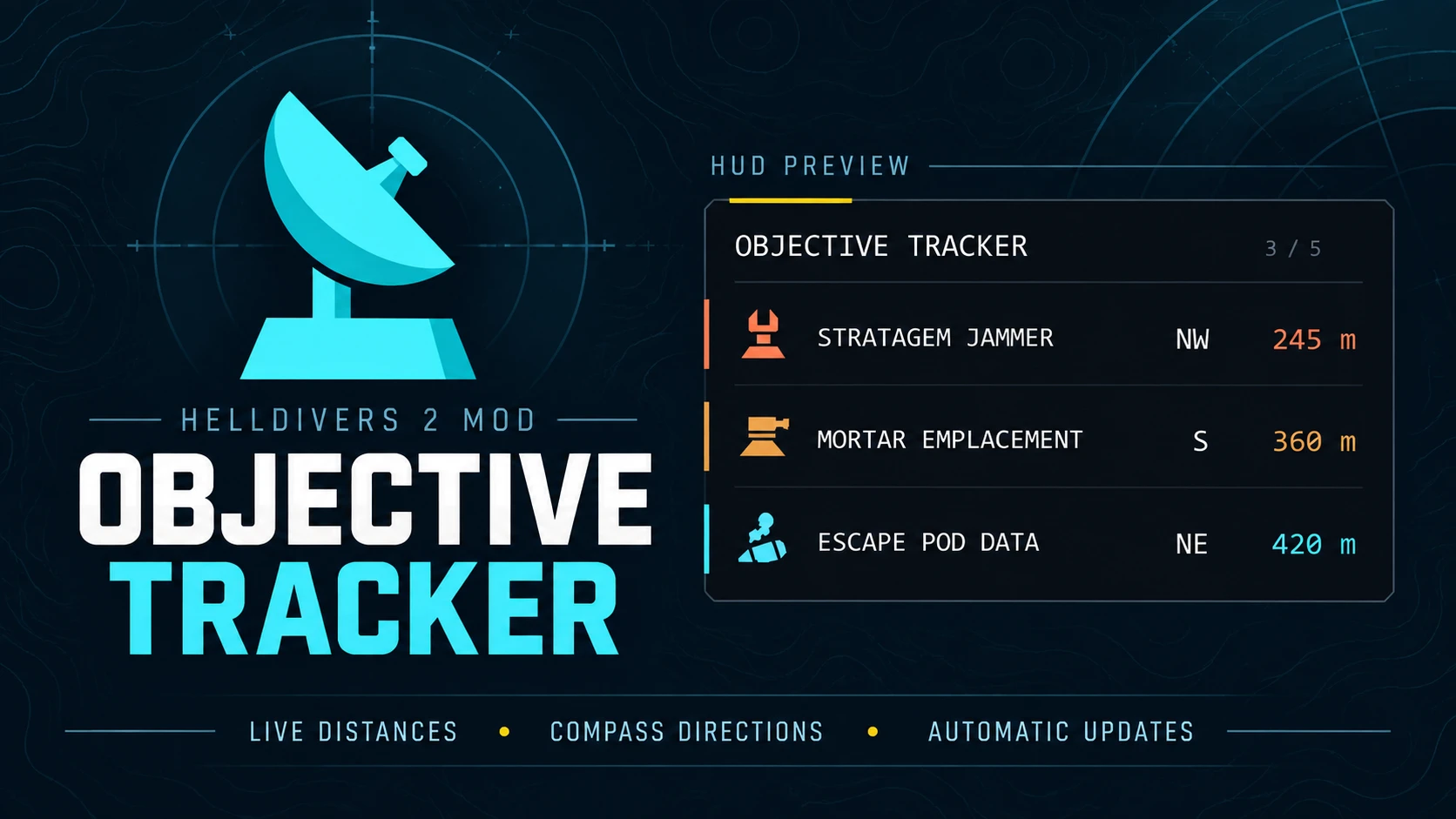
Objective Tracker helps you find your next objective and plan your route across the battlefield. Side objectives, enemy installations, mission tasks and specimen samples appear in one HUD panel from the moment you land, each with its own icon, live distance and an arrow pointing the way.
Targets are sorted by distance as you move. Completed objectives disappear automatically, including the ones your squad finishes, making room for the next destination.
Version 0.7.5 works with the current game. It runs on its own loader and installs through HD2 Arsenal.
- Every objective from the drop. The whole map is listed as soon as you land, not only what is nearby.[/*]
- Exact spots instead of search circles. Where the map only shows a big circle, such as the survey sites for the prospecting drill and the seismic probes, the tracker points at the exact spot.[/*]
- Automatic completion tracking. Fuel pump valves, SEAF Artillery, LiDAR Stations, SAM Sites, Stratagem Jammers, drop-offs, prospecting drills and Orbital Cannons clear as they are completed. Destroyed structures such as control towers, mortar emplacements and ammo stockpiles clear too.[/*]
- Your squad counts. Objectives a teammate takes care of leave your list as well, even when you were on the other side of the map. Joining a mission already under way, most enemy structures your squad destroyed before you arrived are left off.[/*]
- Progress counts. Objectives with several steps show how far along you are, such as PUMP VALVES 2/3 or SEAF ARTILLERY 4/5.[/*]
- Arrow navigation. Each row has an arrow that turns with your view and points at the next part to use, such as the next valve to turn.[/*]
- Easy to read at a glance. Each kind of objective has its own colour and a sharp icon, so a long list of enemy installations is easy to tell apart.[/*]
- Fits the game's HUD. A dark band on the left screen edge with a yellow accent. It keeps the same size next to the game's HUD at any resolution.[/*]
- Compact mode. Set names=0 to hide the names: each row keeps its icon, count, arrow and distance, and the panel is about half as wide.[/*]
- Show only what you want. Hide whole groups, such as the main objectives, the side objectives or the enemy structures. See the settings below.[/*]
- Optional nest tracking. Bug nests, bot outposts and warp ships can be added to the list. They are off by default.[/*]
- 76 objective types across all three fronts, most of them with their own icon.[/*]
- Download the main file and import the ZIP into HD2 Arsenal.[/*]
- Enable Objective Tracker and deploy.[/*]
- Optional: tick Show bug nests, Show bot outposts or Show warp ships in HD2 Arsenal to list them too.[/*]
- F10 shows or hides the panel. Showing it again also reloads your settings.[/*]
- F7 hides the nearest objective.[/*]
- F8 brings back the last objective that you hid or that left after your squad walked away from it.[/*]
- F9 writes the current list to the log.[/*]
- F6 turns adjust mode on and off. While it is on, the arrow keys move the panel and Page Up and Page Down change its size. Pressing F6 again saves them.[/*]
The keys are keyboard only, and every one of them can be changed in the settings file. In a squad the panel can say NO POSITION for a moment after the drop; it goes away once you move.
Press F6 in game to place the panel: the arrow keys move it, Page Up and Page Down change its size, and F6 again saves your layout. It works aboard your ship too.
Everything else is kept in a text file that is created in your Helldivers 2 folder (the one with the data and bin folders; in Steam: right click the game, Manage, Browse local files) the first time you play:
Code:
Helldivers 2\ObjectiveTracker-settings.txtOpen it in any text editor, change a value, save it and press F10 twice in game to load it. Each line is name=value. A value left empty counts as the default, except for nests, outposts and warp_ships (see below).
Panel
- left and top: where the panel sits, in percent of the screen from the left edge and from the top (0 and 23). F6 sets them for you.[/*]
- scale: the panel's size at 1920x1080 (0.85). Other resolutions keep the same size next to the game's HUD.[/*]
- rows: how many objectives are shown at once, nearest first (8, at most 20).[/*]
- opacity: the background's opacity in percent (80).[/*]
- names: 1 shows the objective names, 0 hides them for a panel about half as wide; each row keeps its icon, count, arrow and distance (1).[/*]
Groups: 1 shows a group, 0 hides it (all 1). The objectives in each group are listed under Supported targets.
- main: the mission's own objectives and their steps, including the structures a mission sends you to destroy.[/*]
- support: side objectives that help in the fight.[/*]
- rewards: side objectives that only give requisition or samples.[/*]
- hostile: enemy structures that are side objectives.[/*]
- research: research objectives.[/*]
- specimens: Mutated Eggs and Automaton Heads.[/*]
Nests (off by default)
- nests, outposts and warp_ships: bug nests, bot outposts and warp ships. 1 shows them and 0 hides them, even when ticked in HD2 Arsenal. Left empty (as the file starts), the Show options in HD2 Arsenal decide.[/*]
Keys and the rest
- key_toggle (F10), key_dismiss (F7), key_undo (F8), key_mark (F9) and key_adjust (F6): the keys under Controls, written as key names such as f5.[/*]
- diagnostics: 1 writes extra detail to the log for bug reports (0).[/*]
- settings: the file's layout version. Leave it as it is.[/*]
The logs and the crash journal are kept in the same folder. If the game folder can't be written, everything stays in %LOCALAPPDATA% instead.
- Main objectives (main): Fuel Pumps, E-710 Hose Connections, Hydrogen Pipelines, Organic Plasma, Communication Uplinks, ICBMs, Launch Codes, Obtain Coordinates, Intel Packages, Black Boxes, Black Box Uploads, Drop-offs, SSSD Drives, Objective Terminals, TCS Stations, Hive Breaker Drills, Seismic Probes, Prospecting Drills, Power Generators, Defend Generators, Civilian Evacuation, Cargo Containers, Platinum Refineries, Fusion Batteries, Battery Stations, Foul Shrines, Raise the Flag, Video Cameras, Record Evidence, Chemicals Backpacks, Thumpers, Spore Lungs, Control Towers, Command Bunkers, Orbital Cannons, Cooling Towers, Assembly Units, Monoliths, Overships, Invasion Ships, Exospires and Exospire cores.[/*]
- Side objectives that help in the fight (support): LiDAR Stations (radar stations), SEAF Artillery, SEAF SAM Sites, Mobile Radar, Defense Cannons, Compromise Automaton Defenses, Antennas and Secondary Extraction.[/*]
- Side objectives for requisition or samples (rewards): Escape Pod Data, Specimen Cases and Mutant Larvae.[/*]
- Enemy structures (hostile): Stratagem Jammers, Anti-Air Emplacements, Detector Towers, Cognitive Disruptors, Gunship Fabricators, Illegal Broadcasts, Mortar Emplacements, Shrieker Nests, Stalker Lairs, Spore Spewers, Hatcheries, Ammo Stockpiles, Fuel Silos, Gazer Spires and Portal Batteries.[/*]
- Research (research): Research objectives.[/*]
- Samples (specimens): Mutated Eggs and Automaton Heads.[/*]
- Nests (nests, outposts, warp_ships; off by default): Bug nests, bot outposts and warp ships.[/*]
Some objectives are the main objective in one mission and a side objective in another, such as escape pod data, illegal broadcasts, hatcheries, fuel silos and ammo stockpiles. They are in their side group, so main=0 never hides a side objective.
If an objective is missing, stays listed after completion, or you notice stutters, set diagnostics=1 in the settings file and press F10 twice before reproducing the issue. Close the game and copy these files from your Helldivers 2 folder (or %LOCALAPPDATA%, if the game folder can't be written):
Code:
ObjectiveTrackerLoader.log
ObjectiveTrackerLoader-previous.log
ObjectiveTrackerLoader-journal.txt
Include the mod version, objective name, what happened and whether you hosted or joined. Copy the logs before your next session, since each launch replaces the older log, then set diagnostics back to 0.
If the panel says OFF AFTER A CRASH, or part of the tracker switched itself off after a game crash, delete ObjectiveTrackerLoader-journal.txt and it will try again on the next launch.
Objective Tracker is a plain Lua script. It doesn't read game memory, load DLLs or try to get around the anti-cheat. The full source code is included in the download so you can see exactly what it does. As with any mod, use it at your own risk.